What is CloudFront? What is CDN? How CloudFront and CDN Works? Advantages and Disadvantages of Using CloudFront and CDN. Connecting Amazon S3 and CloudFront
CloudFront is a Content Delivery Network or CDN service by Amazon Web Services or AWS.
I know it is quite overwhelming to even look at the number of services provided by AWS. Many services start with the word cloud alone.
But don’t worry, I will try to explain each of CloudFront, CDN, S3 and configure them in a straightforward step by step process for you.
So let us begin …
Table of Content
What is CDN?
CDN stands for content delivery network or content distribution network. So it is mainly used to deliver the content efficiently.
Websites consist of web pages. Each page may vary the content based on the user. But within the page, there is static content like images, media (audio or video), JavaScript, and CSS.
Such static content served from CDN instead of from the webserver.
What is CloudFront?
Many companies provide CDN as a service. Akamai, KeyCDN are companies that provide only CDN as a service.
Amazon has many web services, and its CDN as a service is known as CloudFront.
In other words, CloudFront is a CDN service by Amazon.
How CloudFront and CDN Works?
The CDN companies want to serve the static content to users efficiently. So they deploy many edge servers at various locations worldwide. It helps in reducing the load time of the resources which in-turn helps in fast loading of the website.
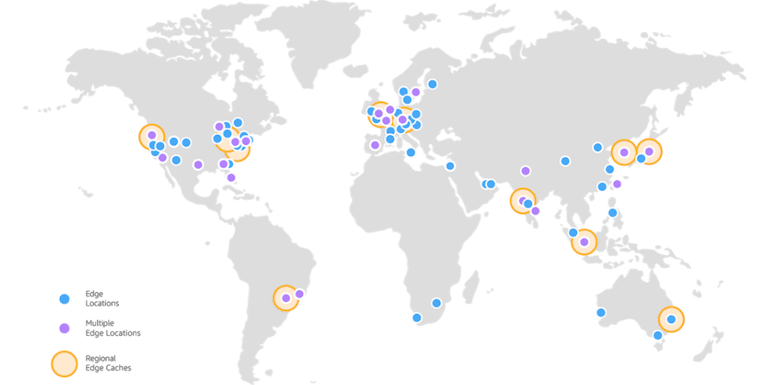
Here are the edge locations for CloudFront.
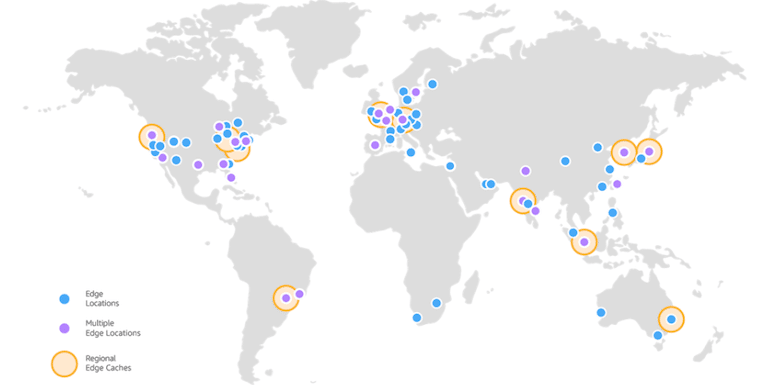
More and more edge locations are being added over time by Amazon.
To serve the static resources, CDN will store a copy of the resources (as cache) on each of the edge servers and serve the content from the nearest location to the user.
Read the Difference between Cloudflare and CDN.
Advantages of Using a CloudFront or CDN in General
Every website should use a CDN because it helps speed up the complete process of rendering the page.
Here are some of the prevalent advantages of using a CDN
1. Content Served From Nearby Location
If you are browsing BizTips, your browser requests the content from my host. Each element of the page (aka images, video, audio, Scripts, Stylesheets) has to be served to you by my webserver.
Using a CDN means, static content of a web page can be served from a nearby location, thus reducing the time to download the element. The static elements also form 70% to 80% of the total size of a page. Moreover, images (and video if any) contribute the most to the overall size of the page.
In total technical terms, it is termed as Lower Network Latency.
2. Reduces Load on the Web Server
As a user, you type a url and hit enter. The browser requests the content of the page which comprises of many elements. The browser requests each such items separately.
If static elements like images, videos, stylesheets, scripts are served outside of web server, it reduces the overall load on the server. It thus makes it possible to serve many more user at a given point of time.
So for example, if a server can process 100 concurrent users, having a CDN can mean it can serve a lot more than 100. It happens because the server isn’t required to serve the static resources for each user.
3. Allows Parallel Downloading of Resources
Browsers can download resources from different locations parallelly.
Here is the waterfall model by WebPageTest.org fetching content in parallel mode from a CloudFront CDN and webserver.
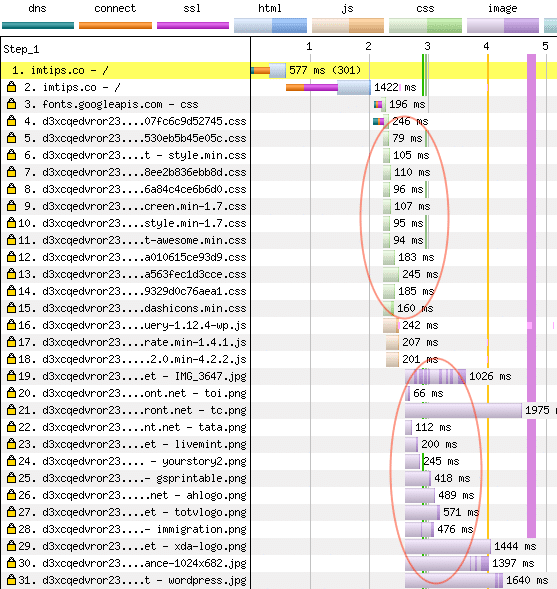
One more point to note here is, CSS, as depicted with green color and images as depicted by violet color, are downloaded simultaneously.
4. Completely Scalable
CloudFront CDN charges are based on pay as you go. A spike in traffic will have no impact on the delivery of the content, which makes it scalable.
I agree there will be an increase in the cost, but the growth in traffic is always a good problem to have for a webmaster.
5. Highly Reliable
CDN has multiple redundancies of the same content.
If one of the edge locations is down or a server in the edge location isn’t available, requests can transfer to the next accessible server either on the same edge location or to another edge location.
6. Very Cost-Effective
CloudFront or CDN, in general, reduces the load on the main server by serving a significant portion of a page. So when a CDN serves images, scripts, stylesheets as well as other media files, it frees up the main server. So it can process the primary content and the database work of more users at a given point in time, making it cost-effective.
Moreover, consider the cost to host a server on each continent?
With CDN as a service, you get the benefit of hosting an edge server at numerous locations. The cost is almost next to nothing.
Disadvantages of Using CloudFront or CDN in General
There are two sides of every coin, and CDN is not different. So let us look at some of the disadvantages of using a CDN.
1. It Can Serve Only Static Resources
CDN cache each element. So it can serve static content and isn’t ideal for server-side processing.
So you still need a server to host a website. CDN can’t do it all by its own.
2. Long-time to Invalidate Cached Data
Any data on a CDN will be cached across all edge location. Once it needs to be changed, there is a process to invalidate.
As an example, you uploaded an image. Now you want to replace the image with some changes.
For CDN and Cloudfront, the ideal solution is to use a new url for the replacement image. Because if you want to replace the images on all edge locations, you have to invalidate the image first, which can take a long time. Even if the image is invalidated on the edge servers and the new image is online, the user browser may cache the image. So users may not see the new image at all.
Personally, I haven’t seen invalidation take a long time for other CDN providers like KeyCDN, but for CloudFront, it takes significant time to invalidate item from all edge locations.
What is Amazon S3?
Amazon Simple Storage Service (or Amazon S3) is a storage service by Amazon Web Services or AWS. It can be used to store and protect any amount of data for websites, mobile applications, backup archives, etc.
As an example, any website can store their images or videos or audio files on Amazon S3 instead of hosting server. It can help in multiple ways, and one of them being, the host’s backup size will reduce because a big chunk of data is stored on S3. Moreover, when moving servers, it can be easy to move when the amount of data involved is low.
In other words, S3 is for storing data in a very scalable way with top-notch security and reliability. CloudFront is a cloud-based front end to serve the data.
How to Create a CloudFront CDN Distribution for a Website?
The process to create a CloudFront distribution for a website is relatively simple. Let me share the screenshot of each step.
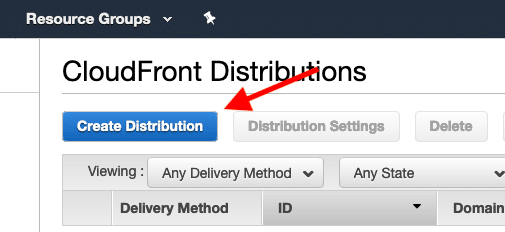
1. Click on the Create Distribution button on the CloudFront Distribution Service page.
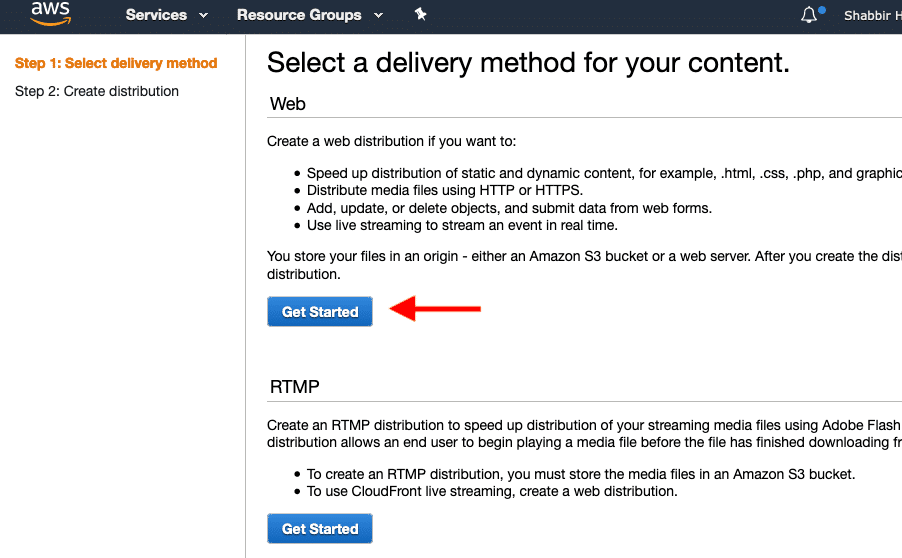
2. Select the Web as the delivery method for the content.
3. Specify the site url for which you wish to create the distribution.
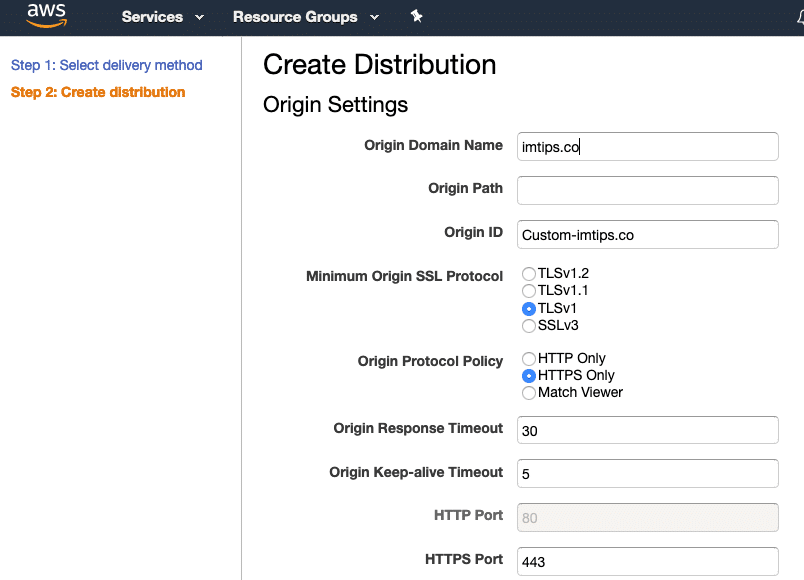
You can let the other settings remain as they are. If you wish to use the CloudFront URL for HTTPS only, you can change it but keeping it as Match Viewer isn’t a bad idea either.
Once you submit the form, the process to create CloudFront distribution will show as “In Progress.” Wait for a few minutes and let the status change to Deployed.

Once done, browse the site using the distribution url like d3037fd1gzi13p.cloudfront.net. It will serve the static copy of your site’s home page.
Now you can use the CloudFront url of the form dxxxx.cloudfront.net.
How to Configure CloudFront Distribution for S3?
First, we will create an S3 Bucket. Click on Create Bucket Button.
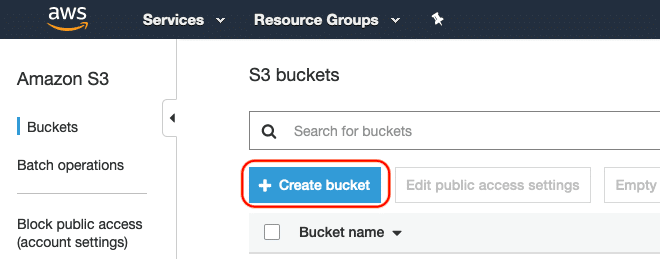
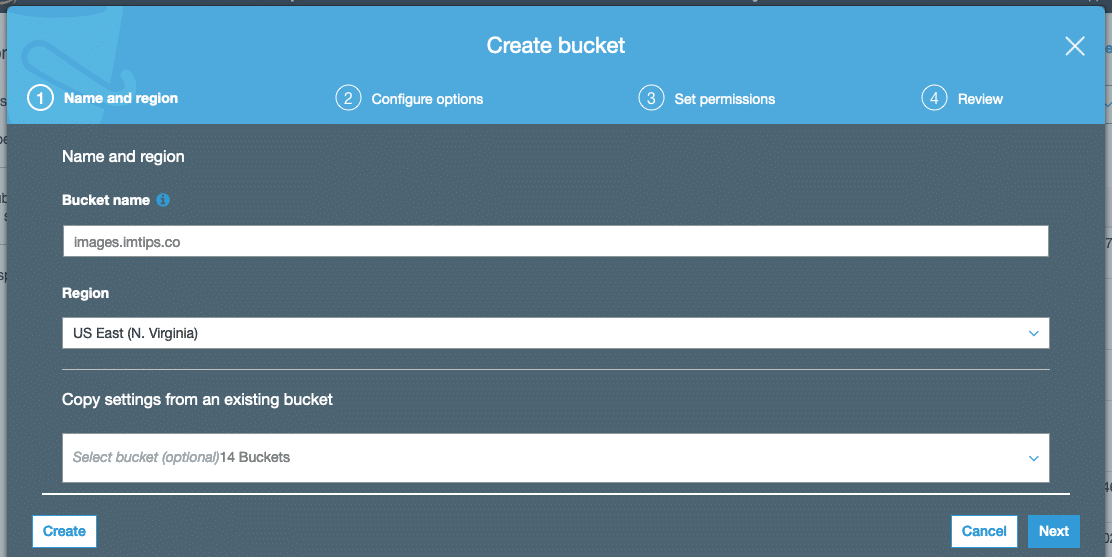
The creation of an S3 Bucket is a 4 step process.
In Step 1, Select the bucket name. I like to keep the name the same as the url I prefer using for accessing in from the websites. I am using images.biztips.co
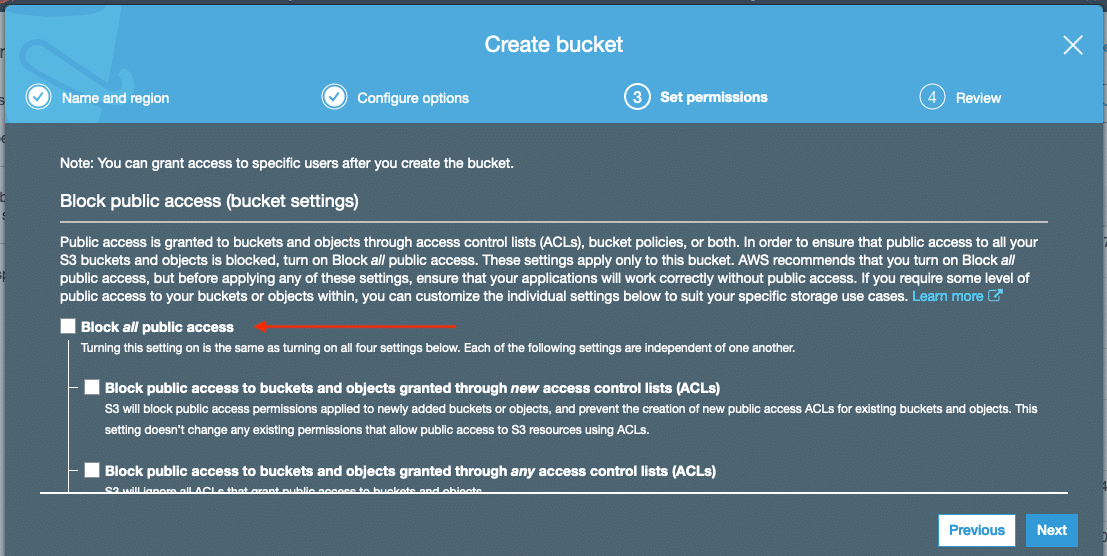
Leave default settings in step 2 and move on to step 3 to Uncheck Block all Public Access.
In the final step, click the Create Bucket button.
Once the bucket is ready, select it and click anywhere on the Permissions Area.
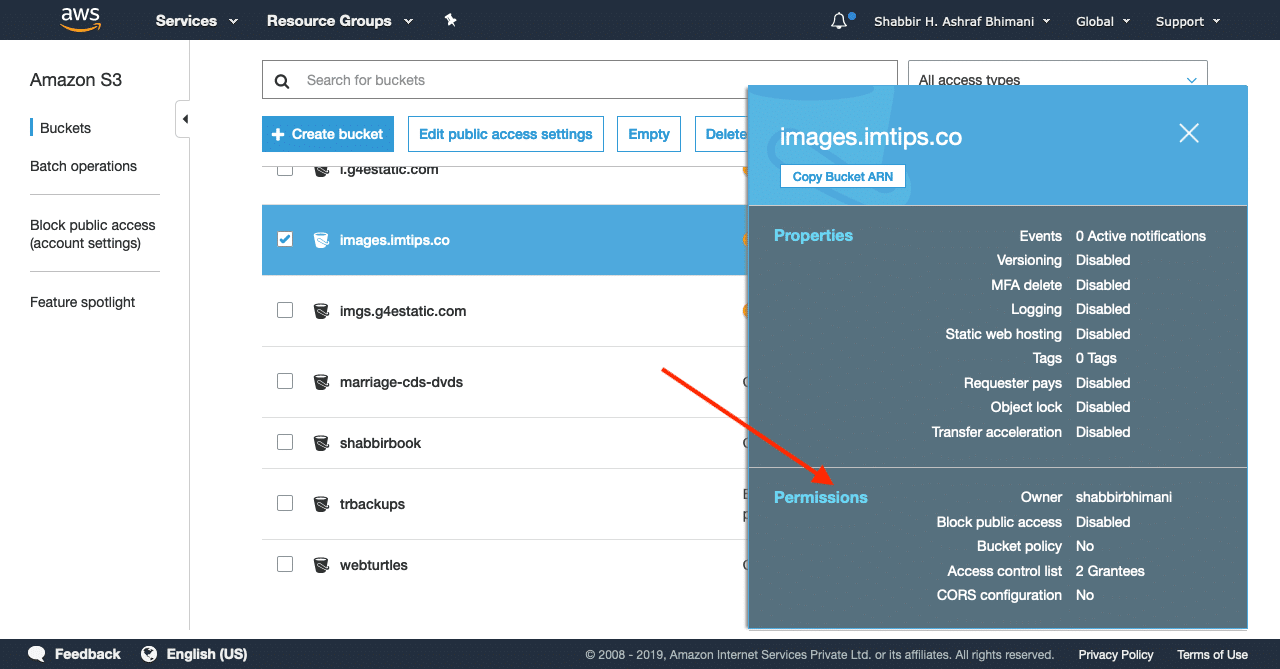
Now under the Permissions tab > Access Control List > Public access.
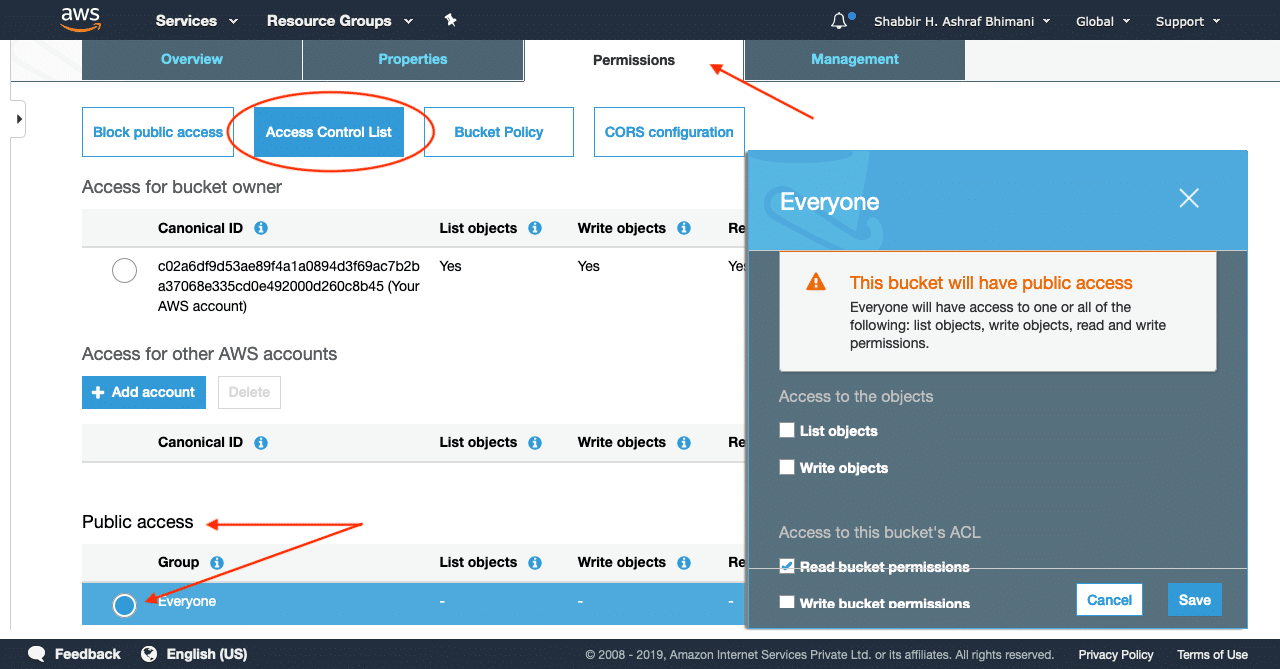
Only tick the Read bucket permissions and click on Save.
Now we have the publicly available bucket ready in S3. So the process to create a CloudFront distribution for S3 is precisely similar to the website with the only difference being, we have to select the S3 Bucket as the origin.
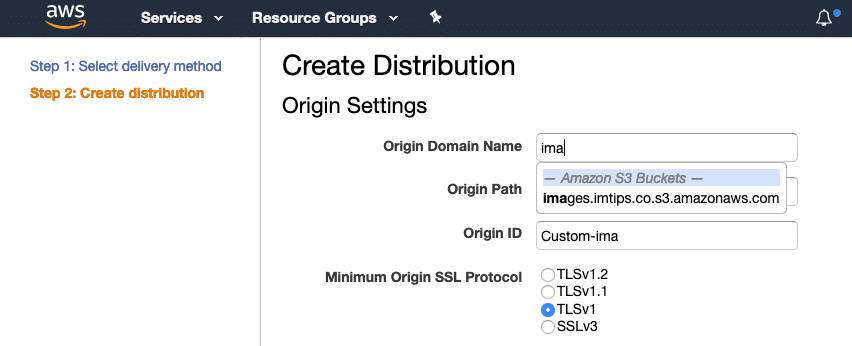
After the status becomes deployed, you will have a unique CloudFront.net URL for the distribution.
Should I use Amazon S3 URL or via a CloudFront?
Accessing content using an S3 URL is a possibility, but it also means the cost for each request is much higher when accessed directly via S3.
So an Amazon S3 charges $0.01 per 10,000 requests whereas CloudFront price is many times lower than that. It is only $0.0075 – $0.0095 per 10,000 HTTP Requests.
The amount may sound very low but consider a website having 10,000 Page views per day and each page having on an average ten elements can mean there are 100k requests per day.
Ideally, if CloudFront caches Amazon S3 objects, it can reduce the cost considerably. Moreover, S3 serves the content from one location, whereas CloudFront being a CDN, serves the content from the nearest edge location.
So, use of CloudFront for accessing S3 Objects is preferable.
How to Customize CloudFront URLs With CNAME?
Finally, if we don’t want to use randomly generated CloudFront URLs, we can customize them using CNAME.
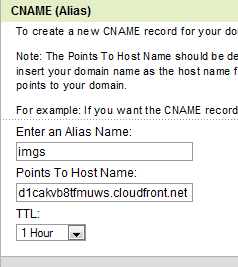
So if you wish to use imgs.biztips.co as an alias for the CloudFront URLs, visit the DNS control for your domain and set up a CName for imgs with CloudFront url as the target value.