AWeber Footer SlideUp – My First WordPress Plugin

by Shabbir on June 10, 2010

There are many Footer Slideup form’s available but the problem is they all charge for the script and that is not one time fees but month on month fees for the script. Being a developer myself I thought of creating my own and many of my clients as well as blog users asked the same script from me and so here I come with my first official WordPress plugin AWeber Footer Slideup.

Plugin Description

Footer Slideup Form is one of the best ways to ask your user to subscribe to your list without any interruption or blocking and this plugin does exactly that. It adds an AWeber subscribe form in the footer of your WordPress blog. AWeber is one of the better Auto-responders in the market and it allows you to send series of email message to subscribers. You can read my detailed AWeber review.

Installation Instructions

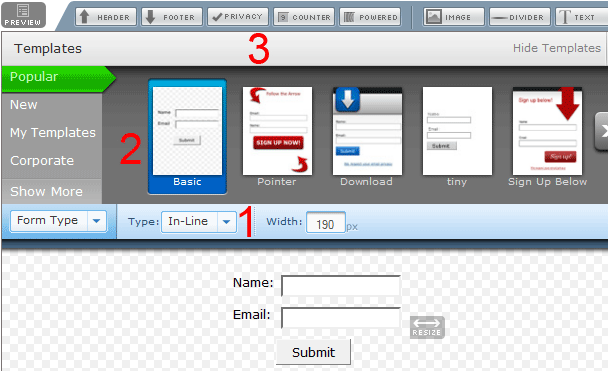
  1. Generate an Inline form using the AWeber Web form Interface.
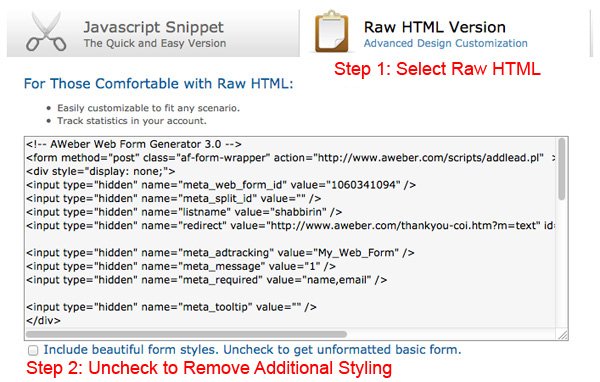
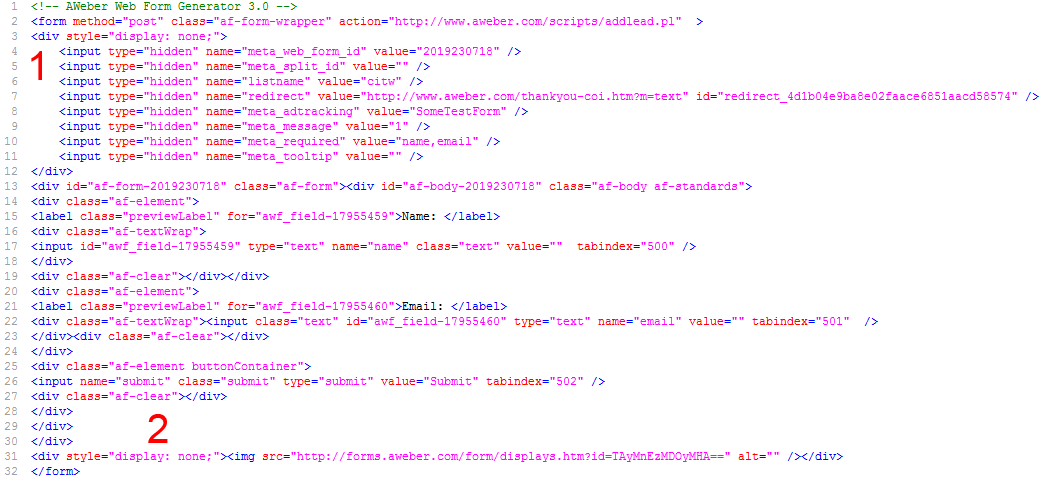
  2. Grab the HTML code of your AWeber Form and Search for Hidden Div which lists all the hidden form fields for subscription. You will see it just after the <FORM> tag.
  3. Upload the plugin folder aweber-footer-slideup in the wp-contents/plugins folder.
  4. Activate the plugin through the ‘Plugins’ menu in WordPress
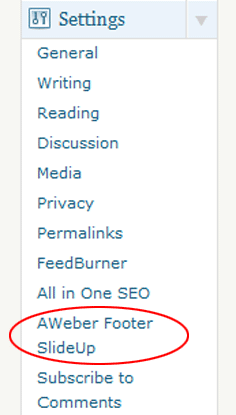
  5. Edit Options under the Menu ‘AWeber Footer SlideUp’. Paste the hidden div HTML Code generated in Step 2.

More detailed installation instruction are here

FAQ’s

How to Edit the Tag Line Subscribe By Email for Weekly Updates?

Heading Tag Line (Optional) in the admin interface of the plugin. Leaving it blank will show the default tagline.

What is Tracking Image URL of AWeber Webform (Optional)?

AWeber RAW HTML Webform tracks the form views and other stats with an image. If you would like to see how many users submit using the footer form you need to add the unique image url of AWeber into the field value. Just near the form end tag you will see <img src=”SomeValue” border=”0″ />. Just copy the SomeValue from the HTML code and past it in Tracking Image URL of AWeber Webform. The Image URL will not be any normal jpg/gif like image.

If you have more queries and questions (Which I am sure you will have) Please post them in comments below and I will be more than happy to help you on this matter.

Sign up for Free Course on Ways to Make Money Online?

Don't wanna sign up but prefer posts delivered to your Inbox?

But if you are not planning to subscribe through Email. Try subscribing to RSS.

{ 187 comments… read them below or add one }

TerryJett June 10, 2010 at 8:27 pm

Great plugin and thank you for sharing!

How hard would it be to make it work with GetResponse?

If you could make it where it would accept “generic” form code, it would be the best plugin of 2010 far as I am concerned:)

Thanks again,

Terry

Reply

Shabbir Bhimani June 11, 2010 at 2:34 am

Not a bad option but making it general would be tough because some code needs to be injected under the visible text fields because AWeber does not support fields in one line.

But yes I can always get one more plugin for GetResponse as well. Should be just vanilla changes,

Reply

Hardi Wijaya June 11, 2010 at 7:59 am

I love this plugin but just can’t get it to work.

Can you please tell me which line of code I should use?

I paste these codes. The plugin doesn’t work.

========
div style=”display: none;”>

========

Reply

Shabbir Bhimani June 11, 2010 at 12:11 pm

Hardi, Yes that code should work. Can you share your blog URL

Reply

Matt Dunlap June 11, 2010 at 3:53 am

Impressive, especially for your first plugin… I'll be using it on my themes. Terry is onto something, you should extend this to include aweber and other mailers.

Reply

Shabbir Bhimani June 11, 2010 at 8:43 am

Matt, Yes I am making the GetResponse Code and I expect to go live by Monday.

Reply

Shabbir Bhimani June 14, 2010 at 1:55 pm

Matt, I have release the Plugin for GetResponse – http://www.codeitwell.com/getresponse-footer-sl

Do let me know your views on the same

Reply

Shabbir Bhimani June 11, 2010 at 3:13 pm

I just investigate few bugs that I were reported and now I have upgraded the plugin by fixing all the bugs.

The major one was on some webserver .cookie in the filename was an issue and so please update to version 0.5 now and it should work for all.

If it still does not work please post your blog URL so that I can have a look.

Reply

Hardi_Wijaya June 12, 2010 at 6:48 am

Hi Shadbbir,

It still doesn't work. I wonder the problem is caused by the theme.

Reply

Shabbir Bhimani June 12, 2010 at 2:32 pm

Would you mind sharing your blog URl so that I can look into it or you can directly email me as well and I will be more than happy to help

Reply

Paul June 15, 2010 at 2:34 am

Same problem not working see:
http://jmyown.com

jmyown@gmail.com

Reply

Shabbir Bhimani June 15, 2010 at 5:03 am

Paul, You have posted the whole AWeber code into the Admin Options but it should only be the hidden fields.

i.e.

<div style=”display: none;”>
<input type=”hidden” name=”meta_web_form_id” value=”956990529″ />
<input type=”hidden” name=”meta_split_id” value=”" />
<input type=”hidden” name=”listname” value=”jmyown” />
<input type=”hidden” name=”redirect” value=”http://www.aweber.com/thankyou-coi.htm?m=text” id=”redirect_f4fe5186a124fb69887fa17ae121ac37″ />

<input type=”hidden” name=”meta_adtracking” value=”My_Web_Form” />
<input type=”hidden” name=”meta_message” value=”1″ />
<input type=”hidden” name=”meta_required” value=”name,email” />
<input type=”hidden” name=”meta_forward_vars” value=”" />
<input type=”hidden” name=”meta_tooltip” value=”" />
</div>

Reply

Paul June 19, 2010 at 6:09 pm

Made corrections as above. Do I need the 'Form” tags at start and end?. Also running Socrates theme and All-in-0ne-SEO plugin. Currently bottom slider is not working.

Reply

Shabbir Bhimani June 20, 2010 at 5:47 am

Paul, we only need the hidden fields and not the form tags. Also All in One SEO it has been tested and there is no issue as I myself is using the same and also Socrates theme has the needed basic hooks and so should not be an issue. Would you mind sharing your blog URL

Reply

Jimmy June 17, 2010 at 6:33 pm

I'm running a wootheme, placed the hidden content as displayed and the foot does slide up but it's your default one?

Reply

Shabbir Bhimani June 18, 2010 at 5:25 am

What do you mean by my default one? Can you share your blog URL. Do you mean to say it shows my AWeber list or do you mean the design of the slideup is mine?

Reply

Jimmy June 26, 2010 at 1:24 pm

The design of the slideup is yours. Even after I enter my aweber code.

Reply

Shabbir Bhimani June 27, 2010 at 5:35 am

The Design can be changed by using CSS into your theme. Let me know if you have some idea about CSS and so I can explain what you should be doing to make the changes.

Reply

Natdye June 23, 2010 at 7:28 am

Great Plug in. Can we change the look of it at all? Like the colors or the text?

Reply

Shabbir Bhimani June 23, 2010 at 9:35 am

Natdye, Thanks for the feedback and yes you can do that using your own theme CSS file or even editing the plugin CSS file. I will suggest you to edit the theme CSS file to have the extra CSS value as your desire.

The plugin is completely CSS based and the id under which all CSS fall are footerform and so editing the CSS file will not impact other areas of your blog.

Reply

Natdye June 23, 2010 at 6:22 pm

Awesome! I was able to change the tag line and remove the name feild, which I hear converts better.
What part of the CSS code do I look for to change the background color, and the text color of the tag line?

Thanks.

Reply

Shabbir Bhimani June 25, 2010 at 4:57 pm

footerform background.

Reply

Nathandye0202 June 29, 2010 at 5:22 am

I can't find that in the code anywhere. how can I locate that section? I am in the plug-in editor option, I have selected the aweber footer slide up. I hit ctrl+f and type in footer background, but nothing comes up. What else can I do to find it.

Thanks.

Reply

Shabbir Bhimani June 29, 2010 at 6:24 am

You edit the the CSS file and their you will see something code like the following link

http://plugins.svn.wordpress.org/aweber-footer-

You can edit the following line

background:#6699CC;

to have your own back ground color.

Also you can copy the content of the CSS file into your themes CSS file and then edit the color accordingly.

Reply

Alan Cutten June 25, 2010 at 11:35 am

Hi Shabbir

I have installed the Aweber Footer Slide Up and added the following under settings

<div style=”display: none;”>
<input type=”hidden” name=”meta_web_form_id” value=”1451651594″ />
<input type=”hidden” name=”meta_split_id” value=”" />
<input type=”hidden” name=”listname” value=”mindvisitors” />
<input type=”hidden” name=”redirect” value=”http://www.aweber.com/thankyou-coi.htm?m=text” id=”redirect_744ddfef3095180dfe863e66bae3a047″ />

<input type=”hidden” name=”meta_adtracking” value=”Mindset_Visitor” />
<input type=”hidden” name=”meta_message” value=”1″ />
<input type=”hidden” name=”meta_required” value=”name,email” />
<input type=”hidden” name=”meta_forward_vars” value=”" />
<input type=”hidden” name=”meta_tooltip” value=”" />
</div>

My problem is that the slideup bar is not working, I am currently using the Ultimate Blogging Theme 3.0.6, could that be the problem?

Thanks

Alan
http://www.traders-live.com

Reply

Shabbir Bhimani June 25, 2010 at 4:19 pm

Alan, You have jQuery conflict: jQuery is loaded two times and the second time is loaded by some other plugin and so Footer SlideUp is screwed.

Reply

Shabbir Bhimani June 25, 2010 at 4:44 pm

Alan, I just released 0.6 version of the plugin to take care of the conflict issue with any other jQuery version and let me know if it works for you now.

Reply

Alan Cutten June 26, 2010 at 8:48 am

Hi Shabbir

Yes thank you it is working now :)

Tell me is there a way to have a different slide up on different pages of the site?

Thanks

Alan

Reply

Shabbir Bhimani June 27, 2010 at 5:34 am

Alan, Can you explain a bit more on what you meant by it.

Reply

Hardi Wijaya June 30, 2010 at 5:18 am

I think Alan means that, the plugin gives us an option to choose slide ups of different design, and show up in different pages of our choice. This would also be great for doing some split-testing.

Reply

Shabbir Bhimani June 30, 2010 at 11:57 am

Hardi, yes we can have that in the future as currently I have lot of supporting queries that I am thinking of getting it solved.

Reply

Yipee June 26, 2010 at 3:20 pm

Something I always wanted to have but can you make it work for Feedbruner

Reply

Shabbir Bhimani June 27, 2010 at 5:35 am

Stay tuned. It is coming soon as I see the same request from many other users

Reply

Shabbir October 16, 2010 at 6:07 am
Joshua June 27, 2010 at 8:17 am

Shabbir,

I tried many times to place my Aweber code…but it never worked…partly because, being not that techie…I don't even know WHERE to paste it…after what? Where should I paste this code? The instructions just said paste the code…I opened up the “edit” section…but don;t know where to paste. Any help would be awesome…thanks!

Reply

Shabbir Bhimani June 27, 2010 at 4:36 pm

Joshua, You will find the hidden form fields in between a hidden div

Something like this.

<div style=”display:none;”>

You will see lot of configuration fields after that code and you have to use those code into the text area in the admin panel

Reply

Joshua July 3, 2010 at 7:59 pm

Shabbir,

I know how to get the code from Aweber…What I don't know is where to paste it in the admin panel of the slide up form.

Could you point me to WHERE it needs to pasted?

Thanks,

*Joshua

Reply

Shabbir Bhimani July 4, 2010 at 4:27 am

Joshua,

After you activate the plugin you will see AWeber Footer Slideup Option which will be added under the settings menu.

Thanks
Shabbir

Reply

Joshua July 4, 2010 at 5:24 am

Shabbir,

Thanks! I got it…but now that it's working…strangely enough…it's actually going BEHIND my blog page and not in front…??? Why would this happen and what would the solution be?

My site is: http://www.thehighvibelife.com

Thanks!

Reply

Shabbir Bhimani July 5, 2010 at 3:28 am

Joshua, your theme's body has a z-index of 3 and so you have to specify a z-index higher than that in the stylesheet. I have released the new version of the plugin and this should take care of the z-index issues now. Do let me know your feedback.

Reply

Hardi Wijaya June 30, 2010 at 5:13 am

I love this plugin. Shabbir is very helpful in helping me. And I'd like to share an experience about this plugin.

Some themes don't seem to work well with this plugin, because there's no some kind of hook function being used — according to email discussion with Shabbir.

If anyone would like to use this plugin, make sure that this code **<?php wp_footer(); ?>** is in the php file. It could be in footer.php or somewhere else.

I don't know much about coding. But what I suspect is that certain theme designers don't include this code in the php file. This is my experience after switching themes for 3 times to find out. Without this code, the slide up doesn't appear.

Reply

Shabbir Bhimani June 30, 2010 at 11:58 am

Yes the footer should have that call as per wordpress documentation and any theme not doing that would mean is not very good well coded.

Reply

OfficeSupplyGeek July 12, 2010 at 2:44 am

I'm having a hard time getting this to work. I am posting this code:
——————————————-
<div style=”display: none;”>
<input type=”hidden” name=”meta_web_form_id” value=”242202337″ />
<input type=”hidden” name=”meta_split_id” value=”" />
<input type=”hidden” name=”listname” value=”osg-weekly” />
<input type=”hidden” name=”redirect” value=”http://www.aweber.com/thankyou-coi.htm?m=text” id=”redirect_d82cca04f4f2fba4482c4f9975138cb6″ />

<input type=”hidden” name=”meta_adtracking” value=”Front_Page” />
<input type=”hidden” name=”meta_message” value=”1″ />
<input type=”hidden” name=”meta_required” value=”name (awf_first),name (awf_last),email” />
<input type=”hidden” name=”meta_forward_vars” value=”" />
<input type=”hidden” name=”meta_tooltip” value=”" />
</div>
——————————————-

When I do this the slide up appears, but when I submit my own info as a test, I get a new page with the following error message:

Notice:
Some required fields are missing:

Name (first)
Name (last)

Please push the “back” button on your web browser to fill in the missing information.
——————————————-

In my custom form that I made I do require a first and last name, and when I paste the above code into the admin screen, the slide up that shows does not show the first and last name required fields. I've uninstalled the plugin for now, but my site is officesupplygeek.com

Reply

Shabbir Bhimani July 13, 2010 at 3:08 am

Hi, It does now work with FirstName and LastName as separate field but works with only name field.

The main reason for this not to work that is because AWeber does not allow any form with horizontal entry form but if you want me to make this one specially for you just get in touch with me and I can get it done for you.

Reply

Carlos July 14, 2010 at 8:21 am

Hey I activated the plugin but can't find the hidden div code you're talking about. I can't get this to work at all. It looks like it should be amazing though! Do you think you could put up a video of how to do it?

This would reallllly help a lot!

Reply

Carlos July 14, 2010 at 8:31 am

Hey I just read all of the comments and now found the hidden part of the code you talked about. I also opened up the settings and pasted everything but can't see anything when I save it. The plugin is activated but nothing shows up.

Here is my URL: http://www.undisputedmarketing.com

Reply

Carlos July 14, 2010 at 8:34 am

Where do I paste the code when I grab it from Aweber? I opened the settings tab and just pasted it in the blank box but nothing shows up.

Can you help me?

here is my url: http://www.undisputedmarketing.com

Reply

Shabbir Bhimani July 14, 2010 at 12:55 pm

Carlos, I looked at the URL and it looks like either the plugin is not active or your theme does not support any kind of HTML insertion in header and footer.

Reply

Dave August 29, 2010 at 11:57 pm

Is there a way to delay the slideup – maybe 5 seconds?
Thanks -Dave

Reply

Shabbir Bhimani August 30, 2010 at 3:15 am

You can do that but only if you can edit the JavaScript Files. Let me know if you can and I will let you know where you need to be doing it.

Reply

Dave September 29, 2010 at 7:32 pm

if its a matter of going to a file and making some minor changes, I can do that.

Reply

Shabbir Bhimani September 30, 2010 at 3:42 am

Yes it is quite simple minor edit and if you can let me know your URL I can help you get it done and if you want me to be doing it for you you can contact me and I can do it for you as well.

Reply

Dave October 19, 2010 at 3:15 pm

Shabbir,
Thanks for all your help.

-Dave

Reply

Shabbir October 20, 2010 at 4:50 am

The pleasure is all mine and if possible do leave a rating on the wordpress page for the plugin

Reply

Richard August 30, 2010 at 9:08 pm

Please Help. The slide up form will not slide down. I'll give you access to the blog.

Reply

Shabbir Bhimani August 31, 2010 at 4:21 am

Hi Richard, I just visited the link you have as your website and I could not see the plugin to be active and do let me know the URL of the blog where you installed it and I will be more than happy to have a look at it.

Reply

Jeremy Vohwinkle August 31, 2010 at 12:13 am

Hi there. Great plugin and I have it working great on my site. I wanted to adjust the delay before it pops up. I know someone mentioned before about editing the javascript file and while I opened it up for a peek I couldn't see what variable I needed to change. Any help in pointing me in the right direction for that would be great. Thanks!

Reply

Shabbir Bhimani August 31, 2010 at 4:23 am

Hi Jeremy, Upgrade to the latest version of the plugin i.e. 0.9 and then open the jquery-libs file under the plugins/aweber-footer-slideup/js folder and you will see the following line

$awfsjQuery('#footerform').slideDown(“slow”);

Replace the line with

$awfsjQuery('#footerform').delay(7000).slideDown(“slow”);

the number 7000 is the amount of delay in milliseconds.

Reply

Jeremy Vohwinkle August 31, 2010 at 1:01 pm

Thanks so much. That worked like a charm!

Reply

Shabbir Bhimani August 31, 2010 at 1:49 pm

My Pleasure.

Reply

Paul August 31, 2010 at 2:19 pm

Hi Shabbir,

A couple of things please.

1. How can I get two form fields instead of one. i.e. name and e-mail. If you could tell me how to make it look like your own rather pretty one at the bottom of this page, all the better :)

2. The link to hide the footer doesn't appear to work in mine. Any idea what I should look for?

Thanks

Paul

Reply

Shabbir Bhimani August 31, 2010 at 5:06 pm

Hi Paul,

1. I have 2 fields already and can you explain what you are trying to do. Also I am using the same plugin as you are and so I am again not sure what you mean.

2. Do let me know your blog URL and I can tell you why it may or may not work.

Thanks
Shabbir

Reply

Paul September 1, 2010 at 3:57 pm

OK, I realised what is going on… with the 2 fields anyway. I got the plugin in a site from somone else. Obviously they changed it at some point.

Any chance of telling me where in the download zip file, I can get your original code? When I delete the plugin via WP admin, then re-install it via admin, it just uses the old code again.

Thanks

Paul

Reply

Paul September 1, 2010 at 3:59 pm

Sorry, when I am talking about the code. I am talking about the Aweber code, and maybe the css.

Reply

Paul September 1, 2010 at 4:19 pm

OK, found the CSS. Changed that code and the js files (just in case). But still need the original Aweber code if it is possible please. You can e-mail me it if you don't want to put it up here. Thanks

Reply

Shabbir Bhimani September 1, 2010 at 4:46 pm

Paul, Just delete the plugin using the wordpress interface and download and use the plugin from here

http://wordpress.org/extend/plugins/aweber-foot

Now about the original AWeber code will be in your AWeber interface and I can only email you once you send me your AWeber login.

Use the contact Us to email your AWeber login if you want me to send you your AWeber code

Reply

Paul September 2, 2010 at 11:28 am

Hi Shabbir

“Just delete the plugin using the wordpress interface and download and use the plugin from here”

Just done that, It still looks the same to me.

I have e-mailed you (via your site) the details of my Aweber account and Blog. Your plugin is currently turned off, till I can get it to work.

Many Thanks

Reply

Shabbir Bhimani September 3, 2010 at 2:51 am

Hi Paul,

Yes I have the email and is responding to it after looking at things.

Reply

Liz September 23, 2010 at 10:26 pm

Hi! Thanks much for a great plugin! I'm having trouble changing the color of the font in the slider. I've edited the css and when that didn't work, added it inline, but neither style is working to change the font color from black/gray to white like my client wants. Any suggestions?

here's the site in question: http://interviewdoctor.com

Reply

Shabbir Bhimani September 24, 2010 at 4:00 am

When I checked in FireBird it does work for me. Just add color:white to div#footerform .tagline and the font turns white.

Reply

Abhik September 25, 2010 at 8:44 am

Awesome. You just saved my $97.

Suggestion for future release. (If you are okay with it).

1. Capabilities of adding an image before the form.. something like ultimate footer ads
2. Using the Wordpress's default jquary file (That'd reduce a http call from server).

Reply

Shabbir Bhimani September 26, 2010 at 3:19 am

Yes I have plans to work on point no 2 but yes I will even add your point no 1 into my list of todo things.

Reply

Nick September 28, 2010 at 12:08 pm

Great post. Exactly what I am looking for. I am a photographer and I am looking for a good wordpress theme that I can use to display my pictures. I will like to use some of these plugins with my site. Any suggestions?

Reply

carlos October 15, 2010 at 6:22 am

Hey I installed the footer and everything is working but the color of it is so light I can’t read my headline. Also how do I add the “subscribe now” button.

This is a new blog I JUST started and I am a novice at this stuff. Can you still help?

Thans

Reply

Shabbir October 15, 2010 at 11:11 am

Hi Carlos, Yes I can help and let me know your blog URL

Reply

carlos October 15, 2010 at 4:34 pm

the website is http://www.acupuncturemarketingideas.com

Thanks so much Shabbir

Reply

Shabbir October 15, 2010 at 6:08 pm

The issue is that you have reformatted your font size and color such that this font size becomes too small.

Let me know how you want it to be corrected and I can do that for you.

Reply

Steve@Trout Fishing Information October 17, 2010 at 11:58 pm

Hi
Can you advise where in aweber i create an INLINE form as all the templates etc seem the standard ones that go in columns?

Also exactly what part should be extracted from the code (what tag?, Hidden div???)
Many thanks
Steve

Reply

Shabbir October 18, 2010 at 4:13 am

Steve, You will see in HTML the <form element and just after that a Div with visibility as hidden containing all the hidden form fields.

Reply

Henning October 18, 2010 at 11:53 pm

Hi there,

first of all great plugin! But mine seems to be a bit squeezed at the bottom and it does display a missing pic icon (at least in Safari). I couldn’t find the tracking picture code in the aweber form either. Any suggestions how this can be improved?

Thanks!

Reply

Shabbir October 19, 2010 at 3:37 am

Please share your blog URL so that I can look into it.

Reply

Henning October 19, 2010 at 12:00 pm

Hi Shabbir, it’s http://www.social-europe.eu and there is no tracker tag in the code of my aweber form. I searched for it with a text editor…

Reply

Shabbir October 19, 2010 at 1:24 pm

I just checked that blog and it is a wonderful blog BTW.

Now about the issues you have.

1. Sticking to bottom and the CSS files have the following property

height:46px; It should be a bit more than 46px

2. Broken Image I could not see even in Safari and can you share a Screen scrap of where you see a broken image.

Thanks
Shabbir

Reply

Craig White October 29, 2010 at 3:28 am

Great plugin! Just installed it and it works great. Just one question. How do I change the color of my subscribe button to a different color. On the original form it should be blue and it shows up in gray in the plugin.

Thanks
Craig

Reply

Shabbir October 29, 2010 at 4:23 am

You need to apply CSS style to the button class. In your theme apply the style for the following class formInputSubmitfooter

Reply

Craig White October 29, 2010 at 7:32 pm

Thanks Shabbir,
Just gave you a little link juice for the great plugin.
Have a great day!
Craig

Reply

Shabbir October 30, 2010 at 6:52 am

Thanks and I really appreciate it.

Reply

Alma October 29, 2010 at 12:22 pm

Hello Shabbir,

Thank you for this plugin!

I just have one question. I have the same issue as Henning– a broken image. I am using Chrome. Here is a screenshot: http://imm.io/1PF3

Thanks in advance. I hope you can help me figure out what to add somewhere to fix that broken image link.

Reply

Shabbir October 30, 2010 at 6:54 am

Hi Alma, The issue comes when you do have some space or something in the Tracking Image URL of AWeber Webform (Optional). Either make it blank completely or add the Image URL from the AWeber form code.

Let me know if this solves your problem or not and if not I will upgrade the plugin to fix this issue.

Reply

Karen November 8, 2010 at 1:22 am

Hi Shabbir,

This is a great plugin!

I have a couple of questions.

1) When someone has clicked on the ‘Close for Now’ how long will it stay closed for? I’m testing it and it hasn’t come back up again and I’m not sure when it will appear again.

2) When I’m looking at my site in IE8 the fields in the footer are partially obscured. They seemed okay in Firefox though. I don’t know whether it’s the theme (I’m still using a default theme during set up) or something else.

http://www.buyingahousemadesimple.com.au

Thanks for your help.

Karen

Reply

Shabbir November 8, 2010 at 4:15 am

Hi Karen,

1. Close for now means it will remain closed until user closes his browser.
2. Test the plugin here itself and see how it works in IE8. It works fine for me. I am using the same plugin here as well.

Reply

Shabbir November 8, 2010 at 5:32 am

BTW you see it screwed in IE is because you have some space added to the optional image tracking field.

Reply

Karen November 8, 2010 at 5:48 am

Thanks for the quick reply.

Do you mean I have some space added in the plugin optional image tracking field?
Or in the Aweber form itself?

I have cleared the optional image tracking field in the plugin and it’s made no difference….

Reply

Karen November 8, 2010 at 6:12 am

I couldn’t clear the field any more than I could so in the end I entered the img src from the Aweber form and that seems to have cured the issue.

Thanks,
Karen

Reply

Shabbir November 8, 2010 at 6:15 am

Then add the valid image URL and it will work. I will update the plugin and work on this bug in the mean time.

Reply

CB November 8, 2010 at 6:26 am

Has anyone got data on the optin rates comparing the footer ad with a regular well-placed sign up form?

Reply

Karen November 8, 2010 at 10:15 pm

Hi Shabbir,
How can you reset the never show again if you’ve clicked on it by mistake?

It there a way to put more space between the ‘close for now’ and ‘never show again’?

Thanks,
Karen

Reply

Shabbir November 9, 2010 at 4:04 am

Clear the cookies and it will come back.
Gap is all controlled by CSS and so should not be a problem.

Reply

Karen November 9, 2010 at 4:14 am

Thanks.
There are very few plugin authors that give this level of service!

Reply

Shabbir November 9, 2010 at 4:15 am

The pleasure is all mine.

Reply

Shabbir November 14, 2010 at 2:37 pm

I upgraded the plugin which handles the bug about the blank AWeber tracking image. Please let me know if you still see any errors.

Reply

Karen November 14, 2010 at 11:05 pm

Hi Shabbir,

I just tried the upgraded version and it works in IE & FF now.

Thanks,
Karen

Reply

Shabbir November 15, 2010 at 3:10 am

Great to see that.

Reply

Karen November 14, 2010 at 11:07 pm

I’ve also added a good rating and a favourable comment on WordPress for you and the plugin!

Reply

Shabbir November 15, 2010 at 3:10 am

That is so nice of you.

Reply

rosemary November 25, 2010 at 1:58 am

Hi
Im no techie and I cant install this plugin. For someone like me the instructions are not clear.

Could someone please tell me (politely??) what part of the Aweber code goes exactly where?

Cheers

R

Reply

Shabbir November 25, 2010 at 4:10 am

After you activate your plugin you will see option under the settings menu as AWeber Footer SlideUp and you have to add the HTML code there.

Reply

rosemary November 25, 2010 at 7:22 am

I dont see a settings option. On the plugin page where all my plugins are listed my only options are active/deactivate, edit, and visit plugin site.

Am I looking on the wrong page perhaps?

R

Reply

Shabbir November 25, 2010 at 8:33 am

Yes. You activate the plugins and then you will see the option in your left sidebar under the settings

Reply

rosemary November 25, 2010 at 2:21 am

Not sure if my previous post got through, so will repeat myself.

I understand which code to insert. Im just not sure where it needs to go exactly in the plugin.

Could someone please tell me?

Im using Wordpress thesis.

Cheers

Rosemary

Reply

Shabbir November 25, 2010 at 4:10 am

Yeah it went through but was flagged and so you could not see Awaiting message.

Reply

rosemary November 25, 2010 at 5:43 am

OOHH. Thanks for letting me know Shabbir. Hope flagged is nice not naughty.

Reply

Shabbir November 25, 2010 at 6:47 am

Yes it was nice :D

Reply

rosemary November 25, 2010 at 10:27 am

Shabbir

Thank you! Im in a part of wordpress Ive never ventured into before.

And I have a slideup!

I would now like to change the colour of the background from blue.

And Id like to change the colour and boldness of the writing too.

Could you please explain step by step what to do?

Cheers

Rosemary

Reply

Shabbir November 25, 2010 at 3:00 pm

You have to edit the plugins CSS file. Let me know if you can the file or want me to suggest how to find the Wordpress plugins editor and then edit the plugins CSS file. If you have issues I can get this done for you as well and if you want to hire me for some work you can also do that here – http://imtips.co/go/elance-profile

Reply

rosemary November 25, 2010 at 8:31 pm

Shabbir Thank you for your offer but Im a one woman band – as you can see from my site. For many reasons, I need to learn and do myself.

I am in the CSS file and I can see lines that relate to the text but I dont see lines that relate to the colours. Could you please tell me what to look for?

I see your footer here is lovely and bold and easy to read. Currently, my footer looks feint and this isnt a good look – for my site or for your wonderful product.

Reply

Shabbir November 26, 2010 at 4:12 am

Perfectly fine and if you see the file you should be able to see
div#footerform .tagline { font-size: 14px; font-weight: bold; font-family: arial; }
and add color:#000 to the tag line.

Also your font in footer is colored that way and as this plugin adds the HTML code in footer it takes some CSS values from your footer.

Reply

rosemary November 26, 2010 at 4:29 am

Thank you Shabbir. Im now in the right place but the headline says: Editing aweber-footer-slideup/style.css (inactive)

How do I make the css active?

Cheers

Rosemary

Reply

Shabbir November 26, 2010 at 5:20 am

Your file permission is not right and it is set as read only. Visit the folder and change the file permission. If you are using Linux it should be 666

Reply

rosemary November 26, 2010 at 5:30 am

Im not using Linux….Im on wordpress. Where do I find “the folder” Shabbir?

Sorry to be so thick but Im not an IT anything and this is like a foreign language to me (an others like me I suspect)>

Cheers

R

Reply

Shabbir November 26, 2010 at 5:58 am

I think you need to see consult your host because I am talking about your server OS and use of FTP.

Reply

rosemary November 26, 2010 at 11:23 am

Thank you Shabbir.

Im not sure what I did but Ive managed to change the colour of the footer without going to my control panel :)

Thank you…..

I might try a couple more modifications now….

Reply

Shabbir November 26, 2010 at 1:33 pm

Congrats !!!

Reply

rosemary November 26, 2010 at 8:29 pm

Must be a mix of good student/good teacher :) Thanks again. Cheers R

Reply

kielc December 3, 2010 at 8:50 pm

Hi,
I have everything set up the way you said to. It pops up and works, however, the subscribe now button is not there? How do I fix this?

Reply

Shabbir December 4, 2010 at 4:05 am

Mind sharing your URL so I can have a look as to why the button is not there.

Reply

kielc December 4, 2010 at 4:07 am
Shabbir December 4, 2010 at 4:17 am

I see the Sign Up Button in the White. I am testing in FF

Reply

kielc December 4, 2010 at 4:23 am

I guess I was expecting what you have on the example, it goes well with my theme.
http://imtips.co/aweber-footer-slideup.html

Reply

Shabbir December 4, 2010 at 8:29 am

It looks like you have some modification done. Ideally background is blue. Did you edit any of the CSS files or anything/

Reply

kielc December 4, 2010 at 7:01 pm

Ya I did. Can you either tell me where the CSS is to make the white background of the submit button another color (i couldn’t find it). or tell me how to make the button a different image. I have snagged your green button from your site and tried putting it in, but it caused problems. I would be fine with just changing the white background of the button to another color just so it stand out more.

Reply

Shabbir December 5, 2010 at 5:19 am

http://denveritedeals.com/wp-content/plugins/aweber-footer-slideup/style.css

You will see div#footerform .formInputSubmitfooter {

Add background:#ColorCode;

I hope it helps.

Also the same property you can add in your own theme’s CSS file as well.

Reply

Christine December 29, 2010 at 7:55 pm

Can I exclude the footer from certain pages or is it a global install?

Christine

Reply

Shabbir December 30, 2010 at 1:58 pm

Global

Reply

Sye Wells January 1, 2011 at 5:27 am

The footer is not working properly on my site at all: syewells.com

Reply

Shabbir January 2, 2011 at 6:38 am

What issues do you see. I see the form is working and is popping up rightly

Reply

Shabbir January 8, 2011 at 2:07 pm

Upgraded the plugin to support Image now. I am not using images myself and though I have thought of all the issues that can come up but if you have any more issues do let me know and I will be more than happy to get it resolved.

Version 0.92

Reply

Justine Simard January 13, 2011 at 10:44 am

Hi Shabbir,

Thank you for a great plugin! I’ve managed to update most of the colours, etc in CSS to match the style of my blog, but cannot locate how to change the colour of the ‘close for now’ and ‘never show again’ text – it barely shows now because it’s grey over green…. would love your help on this please, if you can direct me to the right CSS section! Thank you very much in advance!
Justine

Reply

Shabbir January 13, 2011 at 11:09 am

In your themes a:link and you have to be adding the following style.

div#footerform a:link {}

Reply

Leave a Comment

Spam protection by WP Captcha-Free

Previous post:

Next post: